Where speaker notes live in a PPTX
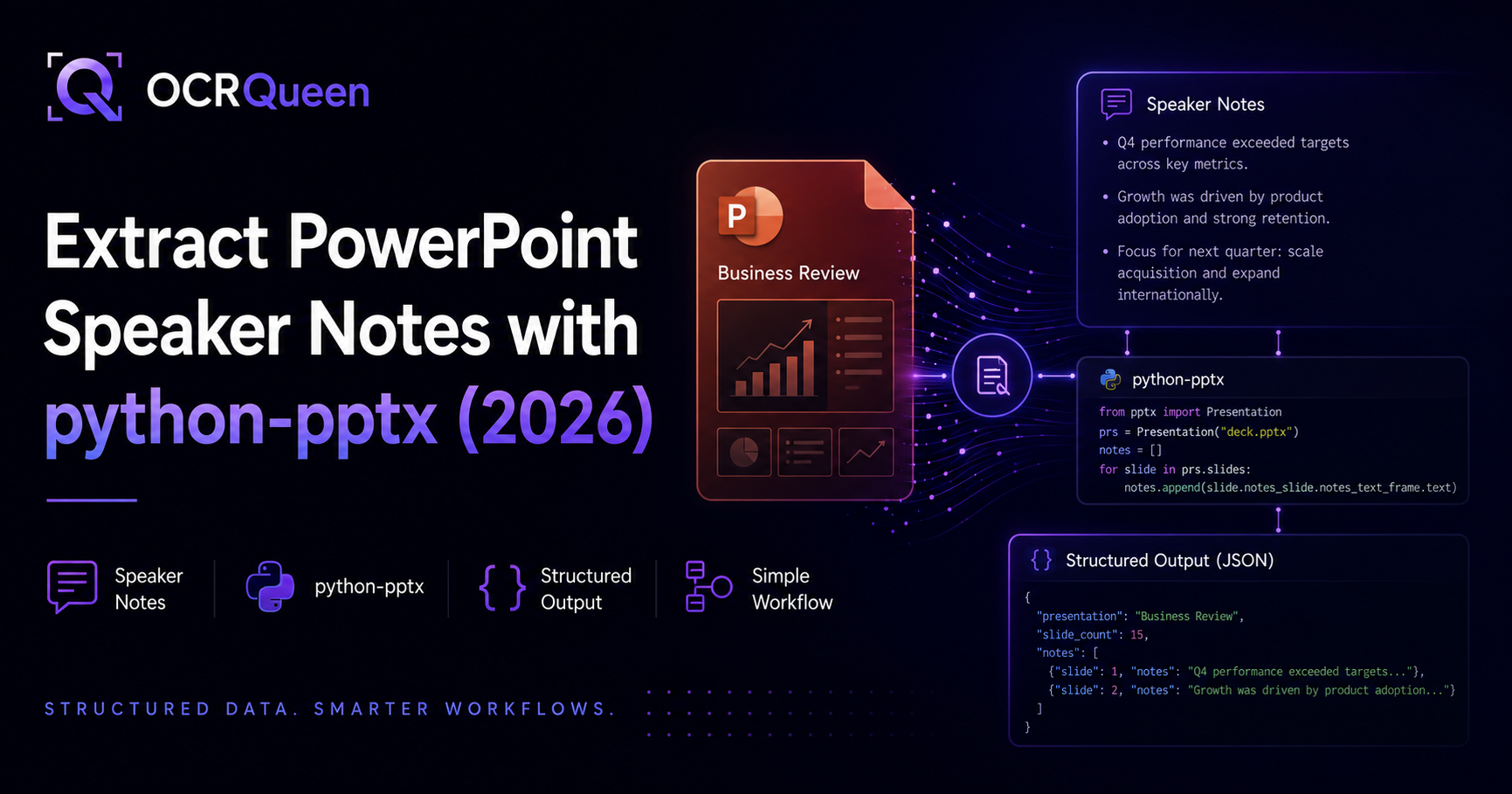
A .pptx file is a zip archive of XML parts. Each slide can have a companion notes slide — a separate XML part that holds the speaker notes you see in PowerPoint's notes pane. The python-pptx library models this directly: a Slide has a notes_slide, and the notes text lives in that notes slide's notes_text_frame.
That's the entire mental model. Everything below is just reading from or writing to that text frame — with one important gotcha that trips up nearly everyone.
Read speaker notes from a slide
Install the library:
pip install python-pptxThen open the deck and read a slide's notes. Guard the read with has_notes_slide (the next section explains why):
from pptx import Presentation

prs = Presentation("deck.pptx")
slide = prs.slides[0]

if slide.has_notes_slide:
    notes = slide.notes_slide.notes_text_frame.text
    print(notes)
else:
    print("This slide has no notes.")
The notes_slide gotcha (read this before looping)
This is the single most common python-pptx notes bug. The rule is simple: has_notes_slide to check, notes_slide to access — and only access after the check when you're reading.
Extract all speaker notes from a deck
To pull every slide's notes — the most common task — loop with the guard and collect them. Here they're keyed by 1-based slide number:
from pptx import Presentation

def extract_all_notes(path: str) -> dict[int, str]:
    prs = Presentation(path)
    notes_by_slide: dict[int, str] = {}
    for index, slide in enumerate(prs.slides, start=1):
        if slide.has_notes_slide:
            text = slide.notes_slide.notes_text_frame.text.strip()
            if text:
                notes_by_slide[index] = text
    return notes_by_slide

for slide_no, notes in extract_all_notes("deck.pptx").items():
    print(f"Slide {slide_no}: {notes}")
Export notes to a text file, JSON, or CSV
Once you have the notes in a dict, exporting is trivial. A plain-text transcript:
notes = extract_all_notes("deck.pptx")
with open("notes.txt", "w", encoding="utf-8") as f:
    for slide_no, text in notes.items():
        f.write(f"=== Slide {slide_no} ===\n{text}\n\n")
Or structured JSON, which is easier to feed into another program:
import json

with open("notes.json", "w", encoding="utf-8") as f:
    json.dump(
        [{"slide": n, "notes": t} for n, t in notes.items()],
        f, ensure_ascii=False, indent=2,
    )
Add or edit speaker notes
Writing notes is the mirror image: get the notes text frame and set its text, then save. Here, creating the notes slide on access is exactly what you want:
from pptx import Presentation

prs = Presentation("deck.pptx")
slide = prs.slides[0]

# Accessing notes_slide creates one if needed — desired when writing
slide.notes_slide.notes_text_frame.text = "Open with the 47% YoY growth."
prs.save("deck.pptx")
For multi-paragraph notes, add paragraphs to the text frame instead of embedding newlines:
tf = slide.notes_slide.notes_text_frame
tf.text = "First talking point."
p = tf.add_paragraph()
p.text = "Second talking point."
prs.save("deck.pptx")
Delete or clear speaker notes
python-pptx has no "remove the notes slide" call, but clearing the text is usually what people mean by deleting notes — set it to an empty string:
if slide.has_notes_slide:
    slide.notes_slide.notes_text_frame.text = ""
    prs.save("deck.pptx")
Edge cases worth knowing
- Formatting is dropped.
notes_text_frame.textreturns plain text — bold, colors, and bullet styling in the notes don't survive. Walk paragraphs and runs if you need formatting. - The slide-number placeholder. A notes slide also contains a slide-image and slide-number placeholder;
notes_text_frametargets only the notes body, so you won't accidentally pull the slide number. - Empty vs. missing. A slide can have a notes slide whose text is empty. The
.strip()+ truthiness check in the extract function above filters those out. - Old
.pptfiles. python-pptx only reads the modern.pptx(OOXML) format. For legacy binary.ppt, convert to.pptxfirst.
Doing this across many decks (at scale)
The code above is perfect for a script over one deck. Across hundreds of decks — or when you need the notes paired with each slide's content (titles, tables, charts) for search or an LLM — you end up building and maintaining a lot of glue: file I/O, the notes gotcha, placeholder filtering, and re-joining notes to slide content.
That's the point where a document-extraction API earns its keep. OCRQueen returns every slide's speaker_notes alongside its structured content (headings, tables, chart data) as JSON from a single call — same schema across PPTX, PDF, and images. If you're feeding decks into a pipeline, that pairing is what you actually want. See the full walkthrough in PPTX to JSON in Python.
Frequently asked questions
How do I read speaker notes from a PowerPoint slide in Python?
Use python-pptx: open the file, and for each slide check slide.has_notes_slide, then read slide.notes_slide.notes_text_frame.text. The guard matters — accessing notes_slide without it creates an empty notes slide as a side effect.
How do I add speaker notes with python-pptx?
Assign to the notes text frame and save: slide.notes_slide.notes_text_frame.text = "..." then prs.save(path). When writing, letting notes_slide create the notes slide on access is the intended behavior.
Why does python-pptx add empty notes slides to my deck?
Because reading slide.notes_slide creates the notes slide if it doesn't already exist. If you loop over slides and touch notes_slide to check for notes, you add a blank one to every slide. Guard with slide.has_notes_slide, which checks without creating.
How do I extract all speaker notes from a PowerPoint file?
Loop over prs.slides, guard with has_notes_slide, and collect notes_text_frame.text into a dict or list keyed by slide number. See the extract-all section above, plus export snippets for text and JSON.
Does python-pptx preserve speaker-note formatting?
No — notes_text_frame.text returns plain text, so bold, color, and bullet styling are dropped. If you need formatting, iterate the text frame's paragraphs and runs and read their properties individually.
What's the easiest way to extract notes from many decks at once?
For a handful, loop the python-pptx code over your files. For volume — or when you need notes paired with each slide's structured content — a document-extraction API returns notes plus content as JSON in one call, so you're not maintaining the parsing glue. See PPTX to JSON in Python.
Sources
- python-pptx — Working with Notes Slides, accessed 2026-07-09.
- python-pptx — Notes Slide (analysis), accessed 2026-07-09.
- python-pptx — Documentation, accessed 2026-07-09.
- OCRQueen — PPTX to JSON in Python, accessed 2026-07-09.
Need speaker notes and slide content, across many decks, as clean JSON? Try a deck in the OCRQueen playground — first 200 pages free.