Why output format matters more than you think
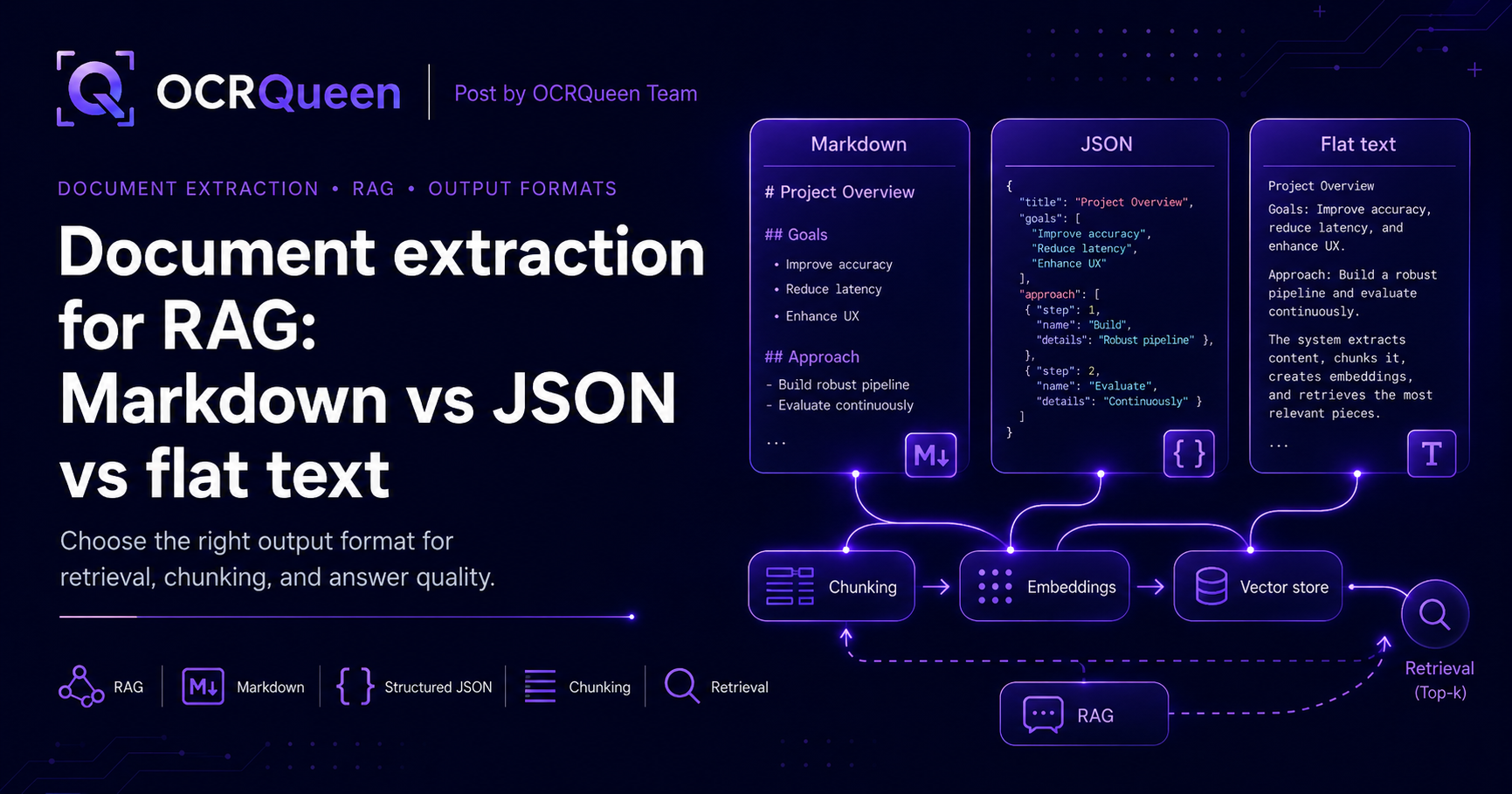
RAG ("Retrieval-Augmented Generation") sounds simple: extract documents, chunk them, embed the chunks, retrieve the relevant pieces, hand them to an LLM. Most teams build that pipeline end-to-end before realising the very first step — what format the extracted text comes back in — silently dictates every step after it.
A page chunked from flat text often splits in the middle of a table. The same page chunked from Markdown splits at the heading. The same page from JSON doesn't need a chunker at all because every block is already its own retrievable unit. None of these is universally right. The wrong one for your use case is what makes a RAG demo work in week one and feel broken in month three.
This guide compares the three main formats your extractor can hand you, shows what each one breaks and fixes, and gives you the patterns to mix them when one format isn't enough.
What "good" RAG-ready output looks like
Before choosing a format, it helps to be specific about what makes extracted output useful for RAG. The good output has all of these:
- Preserves structure — headings, lists, tables, and figures stay distinct, so the chunker has real boundaries to split on.
- Survives chunking — splitting a chunk in the middle of a sentence or table row produces unusable embeddings. Format choice decides where the splits land.
- Carries metadata — page number, section heading, source filename. Without these, "where did this answer come from?" becomes unanswerable.
- Supports filters — real apps filter retrieval by document type, date, source, or section. That needs structured fields, not just text.
- Reads cleanly to an LLM — the final retrieved chunk is concatenated into the model prompt. If it looks like noise, the answer will too.
- Same shape across formats — your code shouldn't fork into three branches based on whether the input was a PDF, PPTX, or screenshot.
How each format handles RAG
| Concern | Flat text | Markdown | JSON |
|---|---|---|---|
| Preserves structure | ❌ Lost | ✅ Headings, lists, tables intact | ✅ Typed blocks |
| Chunker-friendly boundaries | ❌ Splits mid-sentence | ✅ Header-aware splitters work | ✅ One block = one chunk |
| Filters by source / type / page | ❌ | ⚠️ Possible with metadata wrapper | ✅ Native |
| LLM legibility | ✅ Cheap, simple | ✅ LLMs read it natively | ⚠️ Verbose, costs tokens |
| Token cost in prompt | ✅ Lowest | ✅ Low | ❌ Highest (keys + braces) |
| Best at… | Quick prototypes | Default RAG pipeline | Filtered & hybrid retrieval |
Two things from this table that matter once you go live:
- Markdown is the default for a reason. Most RAG frameworks (LangChain's
MarkdownHeaderTextSplitter, LlamaIndex'sMarkdownNodeParser) have header-aware chunkers built in. They cleanly split a document at##boundaries, so each chunk is a coherent section — not a 512-token slice that starts mid-paragraph. - JSON earns its place when retrieval needs filters. Querying "find me paragraphs from invoices issued after 2026-01-01 where the total is over $10,000" needs structured fields, not free-form text. JSON gives you those fields directly; Markdown forces you to re-parse.
How OCRQueen does it
OCRQueen is an API that takes a document and returns both structured JSON and Markdown in a single response. You don't have to commit to one format upfront — pick per pipeline step. Markdown for chunking and embedding; JSON for filtering and hybrid retrieval. The schema is fixed: every piece of content comes back as one of a known set of types (heading, paragraph, list, table, image, chart, diagram), with page numbers and source metadata attached.
| What you can send | What you get back | Modes |
|---|---|---|
| PDF, PPTX, PPT, PNG, JPEG, WebP, HEIC, HEIF | Structured JSON + Markdown (in one response) | standard (text, tables, images) · advanced (adds diagram extraction, image descriptions, OCR on text inside images) |
Two things that matter once you go live:
- Prepaid billing. You add money to a wallet up front. Spending stops when the wallet is empty. There's no surprise invoice at the end of the month — important for batch ingestion jobs where one runaway script can otherwise produce a five-figure bill. See /pricing.
- You decide how long files are kept. For each request you can say "delete the source file after 1 hour" or "delete the result the moment you've sent it back to me." Useful when the documents you're indexing contain personal, medical, or confidential data. Full details at /docs/data-retention.
Get a working setup in five minutes
Install the Python library:
pip install ocrqueenGrab an API key from /dashboard/keys, then run this:
import os
from ocrqueen import OCRQueen

client = OCRQueen(api_key=os.environ["OCRQUEEN_API_KEY"])

with open("research-paper.pdf", "rb") as f:
    job = client.extract.create(file=f)

result = client.jobs.wait(job)

# You get both outputs from the same call — no second request.
document_json = result.result               # structured JSON: filters, metadata
markdown      = result.result["markdown"]   # ready to feed a Markdown chunker

print(markdown[:600])
What the outputs actually look like
The same source page produces three very different shapes depending on which format you grab. Here's the same invoice page rendered three ways:
==== Flat text ====
Invoice #4392
Issued 2026-05-14 by Acme Corp.
Item Qty Unit price Total
Document extraction 10000 $0.003 $30.00
Advanced extraction 500 $0.012 $6.00
Total $36.00
==== Markdown ====
# Invoice #4392

Issued 2026-05-14 by Acme Corp.

| Item | Qty | Unit price | Total |
|---|---|---|---|
| Document extraction | 10000 | $0.003 | $30.00 |
| Advanced extraction | 500 | $0.012 | $6.00 |

**Total: $36.00**
==== JSON ====
{
  "page": 1,
  "blocks": [
    { "type": "heading", "level": 1, "text": "Invoice #4392" },
    { "type": "paragraph", "text": "Issued 2026-05-14 by Acme Corp." },
    {
      "type": "table",
      "headers": ["Item", "Qty", "Unit price", "Total"],
      "rows": [
        ["Document extraction", "10000", "$0.003", "$30.00"],
        ["Advanced extraction", "500", "$0.012", "$6.00"]
      ]
    },
    { "type": "paragraph", "text": "Total: $36.00" }
  ]
}
Choosing format per pipeline step
The mistake most teams make is picking one format for the whole pipeline. The better pattern: use the right format for each step. Here's the breakdown:
| Pipeline step | Best format | Why |
|---|---|---|
| Chunking | Markdown | Header-aware splitters give clean, coherent chunks at ## boundaries. |
| Embedding | Markdown | Embedding models read Markdown natively. JSON braces add noise; flat text loses structure. |
| Retrieval (similarity) | Markdown chunk + JSON metadata | Store the Markdown chunk as the embedded text, attach JSON metadata as a separate field for filtering. |
| Retrieval (hybrid: keyword + vector) | JSON | BM25 / keyword scoring benefits from structured fields (title, headings, tags) that you can boost separately. |
| Prompt construction | Markdown | LLMs read Markdown natively. Don't feed raw JSON braces into the model — it wastes tokens and confuses the answer. |
| Citation / provenance | JSON | "Page 4, third paragraph" needs the page and block index — both first-class in JSON. |
Don't wait for the result — use webhooks instead
Calling client.jobs.wait() works great for one-off ingestion. But when you're indexing thousands of documents into a vector store, you don't want your worker sitting around blocked on each extraction. The better pattern: submit the job, return right away, and let OCRQueen call you back when it's done. That callback is a webhook.
job = client.extract.create(
    file=pdf_bytes,
    options={
        "callback_url": "https://your-app.com/ocrqueen-webhook",
        "extraction_profile": "advanced",
    },
)
# Save job.id alongside your document record and move on.
# The webhook delivers the extraction when it's ready.
To make sure the incoming webhook is really from OCRQueen (and not someone trying to inject garbage into your vector store), we sign every delivery. The signature comes in the OCRQueen-Signature header — an HMAC-SHA256 of the raw request body using your endpoint's signing secret. Verify it before trusting the data:
from ocrqueen import verify_webhook

@app.post("/ocrqueen-webhook")
def handle_webhook(request):
    body = request.body  # raw bytes — do NOT re-serialize
    signature = request.headers.get("OCRQueen-Signature", "")
    if not verify_webhook(body, signature, secret=os.environ["WEBHOOK_SECRET"]):
        return Response(status_code=400)
    payload = json.loads(body)
    ingest_into_vector_store(payload)
    return Response(status_code=204)
Safe retries with idempotency keys
Batch ingestion code retries when things go wrong — a network blip, a queue worker crash, a deploy rollback mid-job. The problem: a retry can accidentally re-trigger an extraction your code already ran, double-billing you and double-indexing the same document. The fix is an idempotency key: a label you attach to your request so that retrying with the same label returns the original job instead of running it again.
import hashlib

# Use a hash of the file content as the key — same file means same key,
# means same result, every time.
content_hash = hashlib.sha256(pdf_bytes).hexdigest()
idempotency_key = f"rag-ingest-{content_hash}"

job = client.extract.create(
    file=pdf_bytes,
    idempotency_key=idempotency_key,
)
Handling sensitive documents
RAG over medical records, HR files, customer contracts, or board minutes means the documents you're indexing contain data that probably shouldn't sit on any server longer than it has to. Two retention settings handle this. Set both to zero and use a webhook to receive the result — the file is deleted right after extraction, and the result is deleted as soon as we send it to you:
job = client.extract.create(
    file=pdf_bytes,
    options={
        "retain_hours": 0,           # delete source file immediately
        "result_retain_hours": 0,    # delete result after webhook delivery
        "callback_url": "https://your-app.com/ocrqueen-webhook",
    },
)
If you need to delete a specific job on demand later (for example, a "right to be forgotten" request), there's a one-call purge:
client.jobs.purge(job.id)
# Source file is deleted. Result is deleted. Only a small record
# remains for billing purposes — no content, no document data.
Three common recipes
Recipe 1: Markdown-first RAG with LangChain
The simplest production-grade RAG pipeline: extract to Markdown, chunk by heading, embed, store. The header-aware splitter keeps each chunk semantically coherent — no torn sentences, no mid-table splits:
from langchain.text_splitter import MarkdownHeaderTextSplitter
from langchain_openai import OpenAIEmbeddings
from langchain_community.vectorstores import Chroma

def ingest_for_rag(pdf_bytes, vector_store):
    job = client.extract.create(file=pdf_bytes)
    markdown = client.jobs.wait(job).result["markdown"]

    splitter = MarkdownHeaderTextSplitter(headers_to_split_on=[
        ("#", "h1"), ("##", "h2"), ("###", "h3"),
    ])
    chunks = splitter.split_text(markdown)

    vector_store.add_documents(chunks)
Recipe 2: Hybrid retrieval with JSON metadata
When users filter ("only show me answers from invoices over $10K, issued in Q1 2026"), pure vector search isn't enough. The trick is to embed the Markdown chunk but attach JSON metadata alongside — your vector store does the filtering before the similarity search:
def ingest_with_metadata(pdf_bytes, vector_store):
    result = client.jobs.wait(client.extract.create(file=pdf_bytes)).result

    for page in result["pages"]:
        for block in page["blocks"]:
            if block["type"] not in ("paragraph", "heading", "list"):
                continue
            vector_store.add(
                text=block.get("text", ""),
                metadata={
                    "page": page["page"],
                    "block_type": block["type"],
                    "source_file": result["source"]["filename"],
                },
            )
Recipe 3: One pipeline for PDFs, decks, and screenshots
Real RAG ingestion isn't only PDFs. Knowledge bases mix in PowerPoint training decks, screenshots of internal dashboards, and HEIC photos people drop into Slack. One API call handles all of them with the same code and the same output shape — so your chunker doesn't need three branches:
def extract_any(file_path: str):
    with open(file_path, "rb") as f:
        job = client.extract.create(file=f)
    return client.jobs.wait(job).result

# All of these produce the same JSON + Markdown schema:
extract_any("compliance-handbook.pdf")
extract_any("onboarding-deck.pptx")
extract_any("screenshot-from-slack.png")
What to know before going to production
| You're worried about… | How we handle it |
|---|---|
| Runaway batch jobs blowing the bill | Prepaid wallet — you top up first, spending stops when the balance is gone. See /pricing. |
| Duplicate chunks in the vector store from retries | Add an Idempotency-Key on the extract call and the same file always returns the same job — only billed and ingested once. |
| Webhooks getting faked | Every delivery carries an OCRQueen-Signature header (HMAC-SHA256 over the raw body). Verify with the SDK helper before trusting the data. Failed deliveries retry automatically. |
| Sensitive document data sitting on an extraction server | Per-job retention controls. Set both windows to 0 for "extract and forget." Or call jobs.purge() on demand. |
| Limiting access for different services | API keys can be scoped. Give your ingestion worker a write key; give your RAG query service a read-only key. Easy to rotate independently. |
| Wanting to keep extracted images in your own cloud | Bring Your Own Storage (BYOS) — we write extracted images directly to your S3 or R2 bucket, alongside the rest of your RAG corpus. See /docs/storage. |
Frequently asked questions
What's the best output format for RAG?
Markdown for chunking, embedding, and prompt construction; JSON for metadata and filtering. Flat text is almost never the right choice — it discards the structure your chunker needs. The "Choosing format per pipeline step" table above gives you the full breakdown.
Does JSON cost more in LLM tokens than Markdown?
Yes — JSON braces, keys, and quotes add roughly 20-40% more tokens than the equivalent Markdown for the same content. That's why you embed Markdown and reserve JSON for metadata. Don't feed raw JSON blocks into the LLM prompt.
How should I chunk extracted Markdown for RAG?
Start with a header-aware splitter (LangChain's MarkdownHeaderTextSplitter, LlamaIndex's MarkdownNodeParser) at ## boundaries with a 256-512 token max. If a section is too long, fall back to a recursive splitter within that section. This keeps semantically related text together and avoids torn sentences.
How do I handle tables in RAG?
Two patterns. Inline: keep the table as Markdown inside the chunk — most LLMs read Markdown tables well. Split out: extract tables as their own first-class chunks with metadata {type: "table"} so users can filter "only return data tables, not narrative paragraphs". OCRQueen returns tables in both shapes (Markdown and JSON 2D arrays) so you can do either.
How do I cite the source page for a retrieved chunk?
Attach page number and source filename as metadata when you embed. With OCRQueen's JSON output, every block has a page field already — just copy it into your vector store's metadata column. At query time, return it alongside the answer so the user can verify.
Can I use scanned PDFs in a RAG pipeline?
Yes. The standard mode handles both digital and scanned PDFs — your ingestion code doesn't need to branch on which type. For the best quality on scanned documents (especially handwritten notes or low-quality scans), pass extraction_profile="advanced".
What happens when the source document changes?
Re-extract the new version, generate new chunks, and delete the old document's chunks from your vector store using the source filename as a filter. Idempotency keys help here — if your re-ingest job retries mid-flight, you won't end up with three copies of the same document.
Should I wait for the result or use a webhook in batch ingestion?
For prototyping, wait. For production batch jobs over more than ~50 documents, use webhooks. The wait pattern serializes your ingestion to the speed of one extraction at a time; webhooks let you submit hundreds of jobs in parallel and process the results as they arrive.
Does OCRQueen handle PowerPoint and screenshots for RAG?
Yes. The same API call handles PDF, PPTX, PPT, PNG, JPEG, WebP, HEIC, and HEIF files, and they all return the same JSON + Markdown schema. So you can pipe an entire mixed-source knowledge base through one ingestion path without branching.
How much does extraction cost for RAG ingestion?
OCRQueen uses prepaid billing — you add money to a wallet, and spending stops when the balance is gone. Current prices are on /pricing. You can try the API on your own documents in the playground for free.
Sources
- Lewis et al. — Retrieval-Augmented Generation for Knowledge-Intensive NLP Tasks (2020), accessed 2026-06-30.
- LangChain — MarkdownHeaderTextSplitter documentation, accessed 2026-06-30.
- LlamaIndex — MarkdownNodeParser API reference, accessed 2026-06-30.
- OCRQueen — Full API documentation, accessed 2026-06-30.
- OCRQueen — Data retention & deletion contract, accessed 2026-06-30.
- OCRQueen — Storage, retention, and BYOS, accessed 2026-06-30.
- OCRQueen Python SDK on PyPI, accessed 2026-06-30.
The fastest way to know if this fits your RAG stack is to try it. Drop a real document into the OCRQueen playground and compare the Markdown and JSON outputs side by side.